SIERRA CHART TRADE COPIER: Trade Copying to Multiple Accounts
Managing multiple trading accounts manually can quickly become complicated. Entering the same order several times increases the likelihood of mistakes and consumes valuable time that could be better spent analyzing markets and managing risk. A Sierra Chart Trade Copier solves this problem by automatically replicating trades from one account to one or more follower accounts in real time.
Whether you're trading your own accounts, managing funded accounts, operating from a VPS, or distributing signals to multiple clients, trade copying technology can dramatically improve efficiency and consistency.
Modern trade copiers have evolved far beyond simple account mirroring. Today's solutions support local and remote trade copying, position scaling, symbol mapping, cross-platform connectivity, and advanced risk management features designed specifically for active traders.
At TopTrades, our trade copier technology is built for traders who require speed, flexibility, and reliability while managing multiple accounts and trading platforms.
- What Is a Sierra Chart Trade Copier?
- Why Traders Use Sierra Chart Trade Copiers
- How a Sierra Chart Trade Copier Works
- Who Uses Sierra Chart Trade Copiers?
- Benefits of Automated Trade Copying
- Why Sierra Chart Is Popular Among Futures Traders
- Local vs Remote Sierra Chart Trade Copying
- Using VPS Servers with Sierra Chart Trade Copiers
- Managing Multiple Sierra Chart Accounts
- Position Scaling and Ratio Sizing
- Symbol Mapping Capabilities
- Why Speed and Low Latency Matter
- Risk Management Features Every Trade Copier Should Have
- Manual Trading and Automated Strategy Support
- Cross-Platform Trade Copying
- Why Prop Firm Traders Use Sierra Chart Trade Copiers
- Sierra Chart Trade Copier Video Tutorials
What Is a Sierra Chart Trade Copier?
A Sierra Chart trade copier is software that automatically duplicates trades from one account, commonly referred to as the master account, to one or more follower accounts.
Whenever a position is opened, modified, or closed in the master account, the trade copier immediately sends corresponding orders to connected accounts. This process happens automatically and helps ensure all accounts remain synchronized.
Professional trade copiers can replicate:
- Market orders
- Limit orders
- Stop orders
- Partial exits
- Profit targets
- Stop losses
- Manual trades
- Automated strategies
The entire process typically occurs within milliseconds, allowing traders to maintain consistency across all accounts.
Why Traders Use Sierra Chart Trade Copiers
As trading operations become more sophisticated, many traders find themselves managing multiple accounts simultaneously. A trade copier allows them to scale their activities without increasing complexity.
Save Time
Manually entering trades into multiple accounts is inefficient. Trade copying eliminates repetitive tasks and allows traders to focus on execution and risk management.
Reduce Human Error
Even experienced traders occasionally make mistakes when entering identical orders manually.
Common errors include:
- Wrong contract quantities
- Missed entries
- Delayed exits
- Incorrect symbols
- Forgotten stop losses
- Uneven position sizes
Trade copiers help maintain consistency and reduce the chance of costly errors.
Manage Multiple Accounts Efficiently
Many traders operate:
- Personal accounts
- Funded accounts
- Family accounts
- Broker-diversified accounts
- Testing environments
Trade copying allows all accounts to be managed from a single execution source.
Scale Trading Operations
As traders grow, manually managing several accounts becomes increasingly difficult. Trade copiers provide the ability to scale without increasing workload.
Improve Consistency
Consistency is critical in trading. A trade copier ensures entries, exits, and risk parameters remain aligned across all accounts.
How a Sierra Chart Trade Copier Works
While the technology behind trade copying is sophisticated, the process itself is straightforward.
Step 1: The Master Account Executes a Trade
The master account initiates a position. Trades may come from:
- Manual order entry
- Custom studies
- Automated systems
- Algorithmic models
- Third-party software
Step 2: The Copier Detects the Order
Immediately after execution, the trade copier captures:
- Symbol
- Direction
- Order type
- Position size
- Stop loss levels
- Profit targets
Step 3: Trade Information Is Transmitted
The copier sends trade information to follower accounts.
These accounts may be located:
- On the same computer
- Across a local network
- On remote VPS servers
- Anywhere in the world
Step 4: Positions Stay Synchronized
Entries, exits, targets, and stop losses remain synchronized, allowing all accounts to follow the master account automatically.
Who Uses Sierra Chart Trade Copiers?
Active Day Traders
Many day traders operate several accounts simultaneously to diversify brokers, strategies, or account structures.
Prop Firm Traders
Funded account traders often manage multiple accounts at the same time. Trade copiers simplify execution and help maintain consistency.
Professional Traders
Experienced traders frequently use account replication to improve efficiency and reduce manual workload.
Signal Providers
Trade copiers make it possible to distribute trades to multiple follower accounts automatically.
Algorithmic Traders
Automated systems can generate trades around the clock, and trade copiers ensure those positions are replicated instantly.
Benefits of Automated Trade Copying
Less Stress
Monitoring several accounts manually can become overwhelming. Automation removes much of the repetitive work and reduces operational stress.
Better Accuracy
Automated replication helps maintain consistency and reduces the chance of human error.
Greater Flexibility
Traders can operate accounts from multiple brokers, computers, and locations while maintaining centralized control.
Increased Scalability
Trade copiers allow traders to grow without dramatically increasing their workload.
Improved Workflow
By eliminating repetitive order entry, traders can spend more time focusing on market analysis and strategy development.
Why Sierra Chart Is Popular Among Futures Traders
Sierra Chart has built a strong reputation among futures traders because of its speed, stability, and extensive customization capabilities.
Popular features include:
- Professional charting tools
- Volume profile analysis
- Market depth visualization
- Low resource usage
- Advanced order management
- Custom studies and automation
- Reliable performance
Because of these strengths, many traders choose Sierra Chart as the centerpiece of their trading operations and rely on trade copiers to expand beyond a single account.
Local vs Remote Sierra Chart Trade Copying
One of the biggest advantages of a modern Sierra Chart trade copier is flexibility. Traders can choose between local trade copying and remote trade copying depending on their setup and requirements.
Local Trade Copying
Local trade copying occurs when the master account and follower accounts operate on the same computer or within the same local network.
This approach offers several advantages:
- Extremely low latency
- Fast trade execution
- Simple installation
- Minimal network dependencies
- Easy account monitoring
Many active day traders prefer local trade copying because of its speed and reliability.
Remote Trade Copying
Remote trade copying allows trades to be transmitted across the internet. The master account and follower accounts may be located on completely different computers or even in different countries.
Remote trade copying provides:
- Worldwide account access
- Flexible VPS deployments
- Multiple office locations
- Greater redundancy
- 24-hour system availability
Remote trade copying has become increasingly popular among prop firm traders and professionals operating multiple trading systems.
Using VPS Servers with Sierra Chart Trade Copiers
Virtual Private Servers (VPS) have become an essential tool for many active traders. A VPS allows trading software to run continuously without depending on a home computer.
Benefits of VPS hosting include:
- Higher uptime
- Improved reliability
- Lower latency to brokers
- Continuous operation
- Protection against power outages
- Remote access from anywhere
By combining Sierra Chart with remote trade copying and VPS technology, traders can create highly reliable trading environments capable of operating around the clock.
Managing Multiple Sierra Chart Accounts
Many traders eventually find themselves managing several accounts simultaneously. Entering identical trades manually becomes increasingly difficult as account numbers grow.
A Sierra Chart trade copier allows one master account to control multiple follower accounts automatically.
Common multi-account setups include:
- Multiple personal accounts
- Funded account programs
- Accounts with different brokers
- Family accounts
- Strategy testing accounts
- Professional money management structures
Trade copying provides centralized execution while reducing workload and maintaining consistency.
Position Scaling and Ratio Sizing
Not every account contains the same balance. Position scaling allows follower accounts to trade different sizes while preserving proportional risk.
Common configurations include:
- 1:1 ratio — identical contract sizes
- 2:1 ratio — double the position size
- 0.5:1 ratio — half-size positions
- Custom ratios based on account equity
For example, if the master account enters two contracts, a follower account using a 0.5 ratio would enter one contract.
This flexibility allows traders to maintain risk consistency across accounts of different sizes.
Symbol Mapping Capabilities
Different brokers and platforms often use slightly different symbol formats. A quality Sierra Chart Trade Copier should support symbol mapping to ensure trades are routed correctly.
Common futures markets include:
| Instrument | Example Symbol |
|---|---|
| E-mini S&P 500 | ES |
| Micro E-mini S&P 500 | MES |
| E-mini Nasdaq | NQ |
| Micro Nasdaq | MNQ |
| Crude Oil | CL |
| Gold | GC |
Custom symbol mapping enables traders to synchronize positions correctly even when contract names differ between brokers or other copy trading platforms.
Why Speed and Low Latency Matter
Execution speed can have a significant impact on trading performance, especially during volatile market conditions.
Fast trade copying helps reduce:
- Slippage
- Missed entries
- Delayed exits
- Position discrepancies
- Execution inconsistencies
This becomes particularly important during:
- Economic news releases
- Market opens
- Breakout strategies
- Scalping systems
- High-volatility environments
Reliable low-latency execution helps ensure that follower accounts receive trades as quickly as possible.
Risk Management Features Every Trade Copier Should Have
Speed is important, but safety is equally critical. Professional trade copiers should include protective features that help minimize operational risks.
Duplicate Order Protection
Duplicate order prevention helps eliminate accidental repeated executions.
Position Synchronization
If a temporary interruption occurs, synchronization features help restore alignment between master and follower accounts.
Maximum Position Limits
Position limits help prevent accounts from exceeding predetermined risk levels.
Trade Filtering
Traders can restrict specific symbols or strategies from being copied.
Automatic Recovery
Modern systems are capable of reconnecting after restarts or temporary communication interruptions.
These features help create a safer and more reliable trading environment.
Manual Trading and Automated Strategy Support
Sierra Chart supports both discretionary and automated trading approaches. A professional trade copier should be capable of handling both.
Supported order types typically include:
- Market orders
- Limit orders
- Stop orders
- Partial exits
- Profit targets
- Stop losses
- Bracket orders
Automated systems can also generate trades that are copied automatically to follower accounts.
This flexibility allows traders to maintain their preferred trading style while benefiting from multi-account synchronization.
Cross-Platform Trade Copying
Many traders use more than one trading platform. Cross-platform trade copying enables accounts running different software to work together seamlessly.
TopTrades supports connections between multiple trading platforms, allowing traders to build highly flexible trading environments.
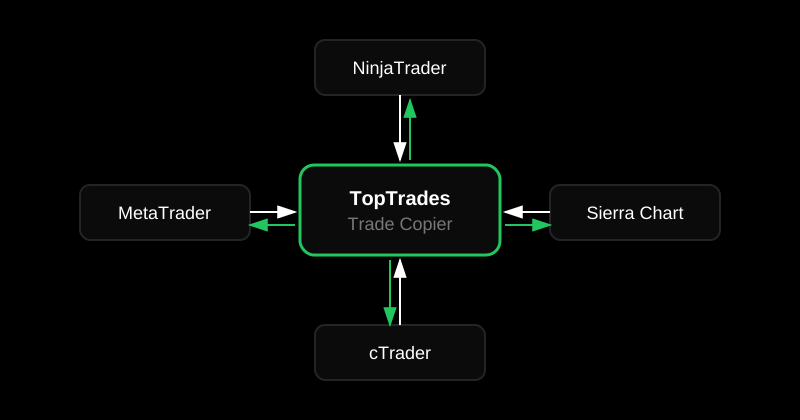
Learn more about:
- Sierra Chart to NinjaTrader Trade Copier
- Sierra Chart to cTrader Trade Copier
- Sierra Chart to MetaTrader Trade Copier
Cross-platform compatibility allows traders to combine the strengths of different trading platforms while maintaining centralized execution.
Why Prop Firm Traders Use Sierra Chart Trade Copiers
Funded account programs have become increasingly popular among futures traders. Managing several funded accounts manually can quickly become overwhelming.
Trade copiers simplify this process by allowing a single master account to distribute trades automatically.
Benefits for funded traders include:
- Improved consistency
- Reduced workload
- Centralized execution
- Better scalability
- Less stress during active market conditions
As traders expand into larger account structures, automated trade copying becomes an increasingly valuable tool.
Sierra Chart Trade Copier Video Tutorials
Watch the Sierra Chart Trade Copier video demonstration for a more detailed explanation on how it works.
Related Videos
- Trade Copying from Sierra Chart to NinjaTrader
- Trade Copying from Sierra Chart to MetaTrader
- Trade Copying from Sierra Chart to cTrader