METATRADER TRADE COPIER: Complete Guide to MT4 and MT5 Copy Trading
Handling multiple trading accounts manually can be time-consuming and increase the likelihood of execution mistakes. A MetaTrader trade copier simplifies account management by automatically copying trades from a master account to one or more follower accounts, helping traders maintain consistent execution without repeatedly entering the same orders.
Trade copiers are widely used by Forex traders, prop firm traders, portfolio managers, and professionals managing several brokerage accounts. Rather than submitting identical trades manually, traders can place a position on a source account and have it replicated across additional accounts within moments.
Today's MetaTrader trade copiers support both MT4 and MT5 and commonly provide features such as cross-platform synchronization, VPS support, customizable position sizing, and advanced risk management capabilities. Whether managing a small group of personal accounts or multiple funded accounts, these tools provide an efficient and scalable approach to multi-account trading.
This guide explores how MetaTrader trade copiers operate, the benefits they offer, setup instructions, common issues traders may encounter, and best practices for effective risk management.
- What Is a MetaTrader Trade Copier?
- How a MetaTrader Trade Copier Works
- Local Trade Copying vs Remote Trade Copying
- Cross-Platform Trade Copying
- Advantages of Using a MetaTrader Trade Copier
- Latency and Execution Speed
- Risk Management
- Symbol Mapping
- Common Problems and Solutions
- MetaTrader Trade copier Setup Instructions
- Frequently Asked Questions
- MetaTrader Trade Copier Use Cases
- Who Could Use a MetaTrader Trade Copier?
- Trade Copier vs Manual Trading
- MetaTrader Trade Copier Video Tutorials
What Is a MetaTrader Trade Copier?
A MetaTrader trade copier allows traders to distribute trades from a master account to one or more follower accounts automatically. Any trading activity performed on the source account, including entries, modifications, and exits, is mirrored on follower accounts according to configured risk and sizing parameters.
Master Account and Follower Accounts
The master account is where trading decisions originate. Follower accounts receive trades automatically based on predefined settings.
| Account | Lot Size |
|---|---|
| Master Account | 1.00 Lot |
| Follower A | 1.00 Lot |
| Follower B | 0.50 Lot |
| Follower C | 2.00 Lots |
Supported Account Types
- MT4 live accounts
- MT5 live accounts
- Demo accounts
- Prop firm accounts
- Broker accounts
- Evaluation accounts
Typical Use Cases
- Managing multiple funded accounts
- Copying between brokers
- Trading multiple strategies
- Portfolio diversification
- Cross-platform trading
How a MetaTrader Trade Copier Works
Trade copying begins with the master account. Whenever a trade is executed, the copier detects the transaction and distributes it to follower accounts according to configured settings.
Step 1: Enter a Trade
Suppose a trader buys EURUSD with a position size of 1.00 lot.
Step 2: Trade Detection
The copier monitors the master account continuously and immediately identifies new positions.
Step 3: Distribution to Followers
| Account | Position Size |
|---|---|
| Master | 1.00 Lot |
| Follower A | 1.00 Lot |
| Follower B | 0.50 Lot |
| Follower C | 2.00 Lots |
Supported Orders
- Market orders
- Limit orders
- Stop orders
- Pending orders
- Stop losses
- Take profits
Position Synchronization
The copier manages:
- Entries
- Stop loss adjustments
- Profit target updates
- Partial closes
- Full exits
Local Trade Copying vs Remote Trade Copying
Local Trade Copying
Local trade copying means all MetaTrader terminals operate on the same computer or VPS.
Advantages
- Fast execution
- Simple setup
- Low latency
- Minimal dependencies
Disadvantages
- Limited flexibility
- Single point of failure
Remote Trade Copying
Remote trade copying allows accounts to operate on different computers and locations.
Advantages
- VPS support
- Multiple machines
- Greater flexibility
- Cloud environments
Disadvantages
- Network delays
- More complex setup
| Feature | Local Copying | Remote Copying |
|---|---|---|
| Speed | Excellent | Good |
| Complexity | Low | Moderate |
| Multiple Locations | No | Yes |
| Flexibility | Limited | High |
Cross-Platform Trade Copying
Modern trade copiers support copying trades beyond MetaTrader.
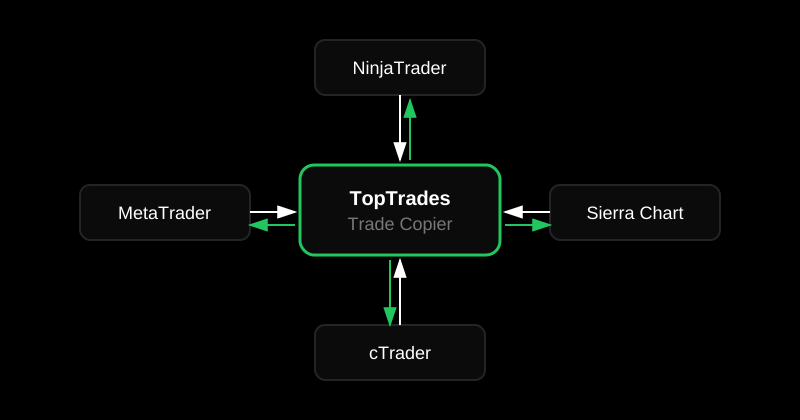
MetaTrader to NinjaTrader
Forex trades executed on MT4 or MT5 can be copied to futures accounts.
Learn more about the NinjaTrader Trade Copier.
NinjaTrader to MetaTrader
Futures trades generated in NinjaTrader can be replicated to MetaTrader accounts.
MetaTrader to cTrader
Many traders combine MetaTrader and cTrader environments.
Read the cTrader Trade Copier guide.
MetaTrader to Sierra Chart
Cross-platform copiers allow synchronization between Sierra Chart and MetaTrader.
Check out the Sierra Chart Trade Copier page.
Symbol Mapping
Different brokers may use:
- EURUSD
- EURUSD.a
- EURUSDm
- EURUSD.pro
Trade copiers translate symbols automatically or through manual mapping.
Advantages of Using a MetaTrader Trade Copier
Manage Multiple Accounts
One trade can control many accounts simultaneously.
Save Time
Manual execution becomes unnecessary.
Reduce Errors
Automation eliminates many mistakes associated with manual order entry.
Improve Consistency
All accounts follow the same strategy.
Support Prop Firm Trading
Funded accounts can be managed more efficiently.
Portfolio Diversification
Capital can be distributed across brokers and account types.
Scalability
Trade copiers grow alongside trading operations.
Latency and Execution Speed
Execution speed is one of the most important considerations when using a MetaTrader trade copier. Although modern trade copiers are capable of copying trades in milliseconds, several factors influence overall performance.
For scalpers, day traders, and traders operating multiple accounts, minimizing latency helps ensure trades are executed as closely as possible across all accounts.
What Is Latency?
Latency is the delay between a trade being executed on the master account and its execution on follower accounts.
Latency is generally measured in milliseconds and depends on both software and infrastructure.
Why Execution Speed Matters
Fast execution becomes increasingly important for:
- Scalping strategies
- News trading
- High-frequency trading
- Fast-moving Forex markets
- Gold and indices trading
Factors Affecting Speed
Internet Connection
A stable and fast internet connection minimizes delays and synchronization issues.
Broker Execution
Different brokers process orders at different speeds. Market conditions can also affect execution quality.
Computer Performance
CPU speed, memory, and overall system performance influence how quickly the trade copier processes orders.
MetaTrader Resources
Running many indicators and Expert Advisors can consume resources and potentially slow execution.
Virtual Private Servers (VPS)
Many professional traders host MetaTrader on a VPS to improve reliability and reduce latency.
How to Improve Performance
- Use a VPS
- Maintain a reliable internet connection
- Reduce unnecessary indicators
- Keep MetaTrader updated
- Choose quality brokers
- Monitor system resources
Risk Management
A trade copier can automate execution, but risk management remains the responsibility of the trader. Proper position sizing and account allocation are essential for long-term success.
Read our complete guide to Risk Management Strategies Every Trader Should Know.
Position Sizing
Most MetaTrader trade copiers support flexible position sizing.
Common approaches include:
- 1:1 ratios
- Fixed lot sizes
- Percentage-based sizing
- Multipliers
Fixed Ratios
| Account | Lot Size |
|---|---|
| Master | 1.00 |
| Follower A | 1.00 |
| Follower B | 0.50 |
| Follower C | 2.00 |
Account Diversification
Splitting capital across multiple accounts can reduce concentration risk and improve flexibility.
Daily Loss Limits
Professional traders often establish maximum daily losses to preserve capital and avoid emotional decision-making.
Drawdown Protection
Many funded account traders follow strict drawdown limits to remain compliant with prop firm requirements.
Scaling Strategies
Trade copiers make it easy to increase or decrease position sizes across multiple accounts as balances change.
Emergency Risk Controls
- Maximum lot size limits
- Daily loss restrictions
- Account-specific sizing rules
- Capital allocation controls
Symbol Mapping
Forex brokers frequently use different naming conventions for the same instruments. Symbol mapping ensures trades are copied correctly.
| Broker | EURUSD Symbol |
|---|---|
| Broker B | EURUSD.a |
| Broker C | EURUSDm |
| Broker D | EURUSD.pro |
Automatic Symbol Mapping
Modern trade copiers automatically recognize many broker suffixes and prefixes.
Manual Symbol Mapping
Users may manually define symbols when broker naming conventions differ significantly.
Common Symbol Problems
- Missing suffixes
- Broker-specific prefixes
- Incorrect instrument names
- Different CFD symbols
Common Problems and Solutions
Trades Are Not Copying
Possible causes include:
- Incorrect configuration
- Disabled Expert Advisors
- Disconnected accounts
- Symbol mismatches
- Permissions issues
Delayed Execution
Execution delays may result from:
- Internet problems
- Slow computers
- Broker latency
- Overloaded VPS servers
Duplicate Trades
Duplicate positions are often caused by:
- Multiple copiers running simultaneously
- Configuration errors
- Overlapping master accounts
Partial Fills
Large positions and low liquidity may result in partial fills, especially during volatile market conditions.
Broker Disconnects
Connection interruptions can temporarily stop trade synchronization.
Solutions include:
- Using a VPS
- Reliable internet service
- Monitoring server status
- Keeping software updated
MT4 and MT5 Compatibility Issues
Not all trade copiers support both MT4 and MT5 environments. Traders should confirm compatibility before installation.
MetaTrader Trade Copier Setup Instructions
Most MetaTrader trade copiers follow a similar installation process.
Step 1: Install the Software
Download and install the trade copier according to the developer's instructions.
Step 2: Connect MetaTrader Accounts
Verify that all MT4 or MT5 terminals are connected and functioning correctly.
Step 3: Select the Master Account
The master account generates trading signals and controls follower accounts.
Step 4: Add Follower Accounts
Follower accounts receive copied trades automatically.
Step 5: Configure Lot Sizes
Common sizing methods include:
- 1:1 ratios
- Fixed lot sizes
- Multipliers
- Percentage allocation
| Account | Lot Size |
|---|---|
| Master | 1.00 |
| Follower A | 1.00 |
| Follower B | 0.50 |
| Follower C | 2.00 |
Step 6: Enable Copying
Activate the copier and verify settings before trading.
Step 7: Test Using Demo Accounts
Before risking capital, traders should confirm:
- Entries synchronize properly
- Stop losses copy correctly
- Profit targets work properly
- Position sizes behave as expected
- Exits remain synchronized
Step 8: Go Live
Once testing is complete, traders can begin live trading with confidence.
Frequently Asked Questions
What Is a MetaTrader Trade Copier?
A MetaTrader trade copier is software that automatically copies trades from a master account to one or more follower accounts. It eliminates the need to manually enter identical trades and helps maintain consistency across multiple accounts.
Does a MetaTrader Trade Copier Work with MT4?
Yes. Many trade copiers support MetaTrader 4 and allow traders to synchronize trades between multiple MT4 accounts.
Does It Work with MT5?
Yes. Most modern trade copiers support MetaTrader 5 and may also allow copying between MT4 and MT5 environments.
Can I Use Both MT4 and MT5 Together?
Advanced trade copiers often support copying between MT4 and MT5 platforms. This allows traders to manage accounts across both versions simultaneously.
Can I Copy Trades Between Brokers?
Yes. Trade copiers are commonly used to synchronize trades between brokers. Symbol mapping features help account for differences in naming conventions.
Can I Customize Lot Sizes?
Yes. Most trade copiers support:
- 1:1 ratios
- Fixed lot sizes
- Multipliers
- Percentage-based allocations
Can I Use a VPS?
Yes. VPS hosting is widely used by professional traders because it provides stability and helps reduce interruptions.
Can I Use Trade Copiers with Prop Firms?
Many funded account traders use trade copiers to manage multiple accounts. Traders should always ensure they comply with the specific rules established by their prop firms.
Are Trades Copied Instantly?
Trades are generally copied within milliseconds. Actual speed depends on broker execution, internet quality, VPS performance, and computer resources.
Can I Copy Trades to NinjaTrader?
Yes. Cross-platform trade copiers can synchronize trades between MetaTrader and NinjaTrader.
Can Beginners Use a Trade Copier?
Yes. Trade copiers are suitable for beginners and professionals alike. However, understanding risk management remains essential.
Is a Trade Copier Safe?
Trade copiers are generally safe when configured correctly. Traders should always test settings using demo accounts before trading live funds.
MetaTrader Trade Copier Use Cases
Trade copiers are used by many different types of traders and trading businesses. Their flexibility makes them suitable for a wide variety of applications.
Managing Multiple Funded Accounts
Funded traders often manage several accounts simultaneously. A trade copier allows them to place one trade and distribute it automatically across all accounts.
Managing Multiple Broker Accounts
Some traders maintain accounts with multiple brokers to diversify risk or access different products and execution environments.
Portfolio Diversification
Trade copiers simplify managing capital across several accounts without requiring repetitive manual execution.
Strategy Testing
Traders may copy trades into demo accounts to evaluate strategies before risking live capital.
Cross-Platform Trading
Modern trade copiers support synchronization between:
- MetaTrader
- NinjaTrader
- cTrader
- Sierra Chart
Professional Account Management
Professional traders and money managers often use trade copiers to improve execution consistency and efficiency.
Who Could Use a MetaTrader Trade Copier?
Forex Traders
Forex traders are among the largest users of trade copiers. Multi-account trading becomes much easier with automation.
Prop Firm Traders
Funded account traders frequently manage multiple accounts simultaneously. Trade copiers simplify this process.
Active Day Traders
Day traders benefit from reduced workload and improved execution speed.
Swing Traders
Swing traders may use trade copiers to maintain consistency across portfolios.
Professional Traders
Professional traders managing larger account groups benefit from scalability and automation.
Algorithmic Traders
Strategy developers often distribute algorithm-generated signals across multiple accounts using trade copiers.
Who May Not Need a Trade Copier?
- Single-account traders
- Long-term investors
- Occasional traders
- Beginners learning basic execution
MetaTrader Trade Copier vs Manual Trading
| Feature | Trade Copier | Manual Trading |
|---|---|---|
| Speed | Excellent | Moderate |
| Multiple Accounts | Excellent | Difficult |
| Scalability | High | Limited |
| Risk of Errors | Low | Higher |
| Learning Curve | Moderate | Simple |
Advantages of Manual Trading
- No additional software
- Simple execution
- Suitable for single accounts
- Complete manual control
Advantages of Trade Copiers
- Fast execution
- Reduced errors
- Multi-account support
- Scalability
- Professional workflow
- Cross-platform support
Which Approach Is Better?
The answer depends on the trader's goals. Single-account traders may find manual execution sufficient, while traders managing multiple accounts often benefit significantly from automation.
MetaTrader Trade Copier Video Tutorials
Watch the MetaTrader Trade Copier video demonstration for a more detailed explanation on how it works.
Related Videos
- How to Set Up a MetaTrader Trade Copier
- Trade Copying from MetaTrader to NinjaTrader
- Trade Copying from MetaTrader to cTrader
- Trade Copying from MetaTrader to Sierra Chart
Related Articles
Conclusion
A MetaTrader trade copier offers an efficient solution for traders who need to oversee several accounts while maintaining consistent execution and reducing the risk of human error. Whether trading Forex, CFDs, funded accounts, or multiple broker accounts, these tools simplify trade management and enhance workflow.
Modern MetaTrader trade copiers are compatible with both MT4 and MT5 and typically include features such as sophisticated risk management, symbol mapping, VPS hosting support, and cross-platform synchronization. This functionality enables traders to scale their activities without sacrificing control over their positions.
Used by everyone from active intraday traders to experienced account managers, MetaTrader trade copiers help improve efficiency and maintain trading discipline. Combined with proper testing and effective money management, they can support a more professional and scalable approach to multi-account trading.
For traders looking to move beyond manual execution, a MetaTrader trade copier delivers the flexibility, speed, and consistency needed to support long-term growth across multiple accounts and trading platforms.